- The Ultimate Platform for Streamer Betting and Esports Duels
How to Mark Enemies
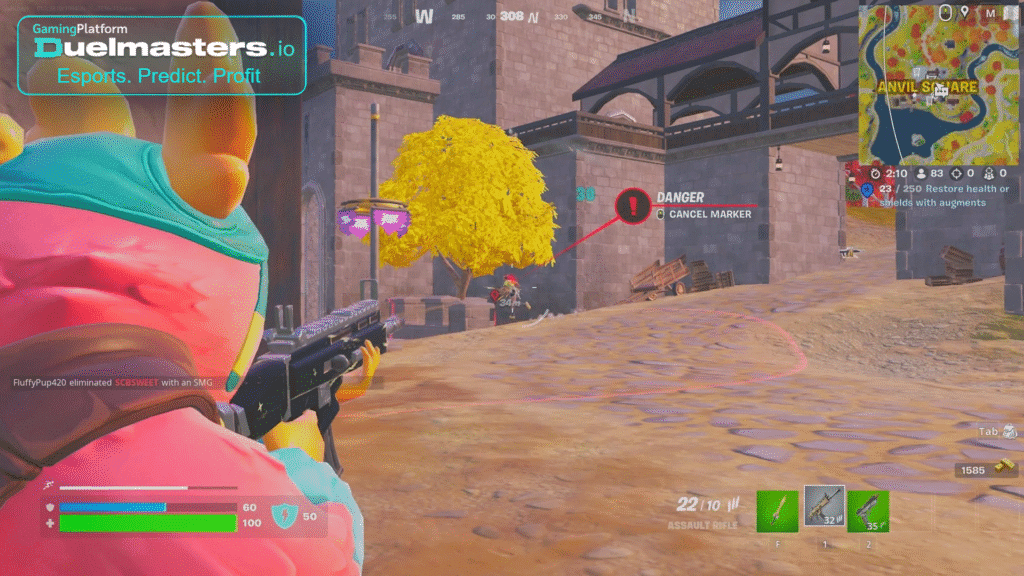
Marking (or pinging) is a mechanic that lets you highlight an enemy or location for your teammates. It’s useful when voice chat isn’t available or in high-pressure fights. How to mark enemies in Fortnite has become a quest or challenge in many seasons.
In Fortnite, marking isn’t automatic — you need to actively aim or use tools that grant the mark. Some augment abilities and items also help in marking foes when they are in range or when you land a hit.
Article content:
- Basic Method: Ping / Mark Button
- Marking That Counts vs Cosmetic Marking
- Advanced Methods: Augments & Items
- Step‑by‑Step: How to Mark Enemies in Fortnite
- Tips to Improve Marking Accuracy
- Use Cases and Tactical Benefits
- Limitations and Common Issues
- Mobile Marking Mechanics
- Marking vs Pinging: Understanding Differences
- Summary
Basic Method: Ping / Mark Button
The simplest and most common method is using the ping or mark button:
- On consoles, the default is pressing left on the D‑pad twice quickly to generate a “danger” or enemy marker.
- On PC, by default, the ping button (often the middle mouse button or another bound key) can be used to mark where you are pointing.
- You must aim at or near the enemy, then double‑press (or fast press) the mark/ping button to register them as “marked.”
This marks the location of the enemy or highlights them for a short time. It’s part of the core “Marking” system in Fortnite.
Marking That Counts vs Cosmetic Marking
Not all marking actions count toward quests or offer gameplay benefit:
- Some season quests require actual enemy marks, not just pings. Not every ping is an accepted mark.
- For example, a “Danger” marker might just notify teammates but not be eligible for quest progress.
- Also, augment abilities (like Bloodhound) can mark enemies after you damage them, but those marks don’t always count for quest objectives.
So when aiming for challenge progress or tactical benefit, use the recognized mark method (double D‑pad, ping, or item/augment methods).
Duelmasters – The Ultimate Platform for Streamer Betting and Esports Duels
Advanced Methods: Augments & Items
Fortnite includes augment perks and special items that help mark enemies automatically or under specific conditions:
- Bloodhound Augment: When activated, enemies hit with a marksman rifle are temporarily marked.
- Tracker’s Armory / Flare Gun: Some versions include a flare or scanner gun that, when used, scans and marks nearby enemies.
- Scout NPCs / Specialists: In some seasons, NPCs or specialized characters scan and mark nearby enemies automatically under certain conditions.
These methods supplement manual marking and are especially useful when doing quests requiring multiple marks.
Step‑by‑Step: How to Mark Enemies in Fortnite
Here’s a practical sequence:
- Identify or see an enemy (visual or via sound).
- Aim your crosshair over or close to the enemy (line of sight).
- Quickly press the ping/mark button (e.g. left on D‑pad twice).
- If successful, the enemy or icon appears above them or on your screen.
- Use augment or item methods if manual marking fails.
Always make sure your settings allow ping/marking (some modes or binds may disable it).
Duelmasters – Watch Streamers, Predict Results, and Win Real Rewards Instantly
Tips to Improve Marking Accuracy
- Don’t spam ping; wait until the enemy is clearly in view.
- Move your aim slightly so the ping registers on them, not on empty space.
- Use augment or item methods when marking manually is too risky.
- Practice in matches to get used to timing and button reflexes.
- Watch streamers on Duelmasters — many show marking in real time, giving clues on when and how they mark under pressure.
Use Cases and Tactical Benefits
Marking supports:
- Team communication when voice chat isn’t available.
- Quest completion in seasonal challenges.
- Prediction and tracking when enemies reposition after being marked.
- Alerts to teammates about dangerous threats or ambushes.
In streaming or competitive matches (especially on Duelmasters), clear marking habits help viewers understand decisions and place more confident predictions.
Limitations and Common Issues
- The marker might not register if you ping too slowly or your aim is off.
- Some quests or challenges only accept specific mark methods, not all pings.
- Enemies behind cover or too far may not be markable.
- Augment or item-based marks typically have cooldowns or restricted conditions.
Be aware of these limits so you don’t waste attempts.
Mobile Marking Mechanics
On mobile:
- You tap or use a designated on-screen mark/ping button.
- Double‑tap or quick taps are used for enemy marking.
- Your HUD layout should place the ping button close to movement or aiming for quick access (TheSpike mobile guide).
Mobile marking functions largely mirror console/PC behavior, adjusted for touch controls.
Duelmasters – Real-Money Esports Betting on Streamers
Marking vs Pinging: Understanding Differences
- Ping / Marker: Generic marker on location, items, or threat.
- Mark / Enemy Mark: Specific identification of enemy, sometimes with gameplay effects (quest or buffs).
- Only specific mark events count for challenges or provide buffs.
Understanding the distinction is key to achieving objectives and tactical utility.
Summary
- How to mark enemies in Fortnite: aim at target, then press mark/ping button (double ping for “danger”).
- Use augment/item methods (Bloodhound, Flare Gun) to assist marking.
- Not all pings count for quests — use recognized methods.
- Marking helps communication, positioning, and competitive understanding (especially in Duelmasters Fortnite Betting streams).
- Practice, refine timing, and observe top players for best usage.